
File In Time
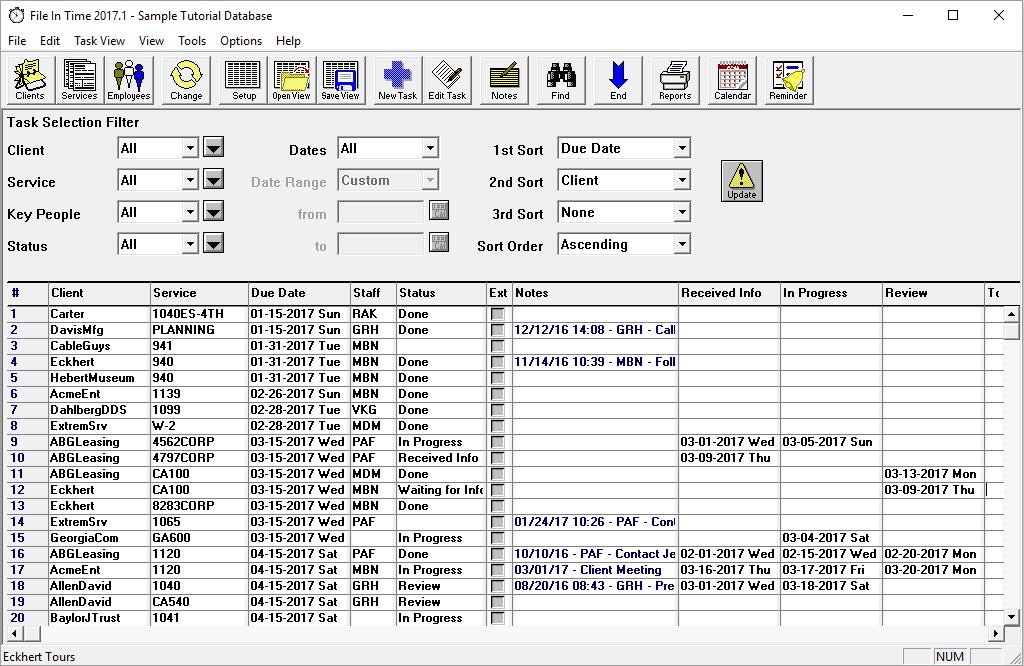
Records client due dates and rolls them forward each year — a classic passive tracker.
| Category | Deadline & Compliance Tracking |
|---|---|
| Best for | Solo · small firms |
| Pricing | Paid license |
| Integration | Export only |
| Official site | www.timevalue.com/file-in-time |
How it connects. It has no public API; data moves in and out by file export. Compare every tool by integration openness →
File In Time pros and cons
Pros
- Does exactly one job — due-date tracking — and has done it for decades; the mental model is a filing cabinet, not a workflow engine
- Comprehensive built-in library of federal and state due dates
- One-time-style licensing rather than another monthly subscription
- Light footprint: no portal, no onboarding project, no per-client setup tax
Cons
- A static calendar: it tracks the dates you enter against its library, but nothing watches for the IRS or a state moving a date
- Windows desktop software with a dated interface
- No API, no integrations — it does not talk to your practice management or tax software
- Per-seat desktop licensing gets awkward for distributed teams
Who File In Time is for — real-world scenarios
The deadline spreadsheet graduate
A small firm whose master deadline spreadsheet has become load-bearing and scary. File In Time is the established, boring, reliable upgrade for tracking what is due when.
The compliance-calendar owner at a traditional firm
One admin owns the calendar for the whole office and wants software older than the intern — stable, local, predictable.
Bottom line
The incumbent for static due-date tracking, and fine at it. Its blind spot is change: when a deadline moves — disaster relief, mid-season IRS notices — it holds yesterday’s date until a human notices. Firms burned by that failure mode are the reason active monitoring tools exist as a category.